CFD Ultimate - Single-user Subscription
Overview
Minimize the need for physical prototypes while providing deeper insight into fluid flow design performance: Autodesk CFD provides computational fluid dynamics software features and thermal simulation tools with improved reliability and performance. Compare design alternatives and better understand the implications of your choices before manufacturing.
|
Highlights
|
|
Design systems with fluid, thermal and motion insights
|
Automate design studies for improved efficiency
|
|

Key Features

|
Flow control applications Optimize designs when you need to improve pressure drop or flow distribution |
Thermal prototyping Solve for all modes of heat transfer, from solid to solid or solid to fluid |
Architectural and MEP applications Improve building efficiency with optimized HVAC design |
|
Free surface modeling Simulate interfaces between liquids and gases. Model flow phenomena like waves, sloshing, and spilling |
Motion simulation Analyze the interaction between solid objects in motion and surrounding fluid |
Humidity and condensation Model condensation of a liquid from a moist gas |
|
Solar heating loads Identify effects of solar heating on energy performance and efficiency of a structure and its spaces |
Smoke visibility Determine smoke patterns as they fill a room to help identify design changes and exit sign placement |
Rotating (turbomachinery) Analyze rotating devices surrounded by a static (non-rotating) frame of reference |
Features
Import and Setup
 |
 |
|
|
Launch from CAD Send CAD models to Autodesk CFD from Autodesk Inventor, Autodesk Revit, AutoCAD Architecture, and AutoCAD MEP. Simplified import of other third-party native CAD models. |
Surface Wrap Consolidate multiple bodies of a model using surface wrap, add an external volume, and generate a quality mesh for transfer into Autodesk CFD. |
Mesh import and adaptive mesh Import existing mesh such as I-deas (.unv) or Nastran (.nas or .dat). Apply adaptive mesh sizing, which utilizes a comprehensive topological interrogation of the analysis geometry to apply appropriate sizes throughout the design. |
Solving
|
Solver manager Schedule, manage, and simulate multiple scenarios from a single dialog. |
Custom result calculations Set up custom result quantities to analyze and visualize quantities beyond the standard CFD results. |
Remote solving Run simulations on remote computers on your network, and schedule multiple solves across different computers. |
|
High Performance Computing (HPC) Autodesk CFD supports running simulations on multi-core computers, as well as with clusters of computers. |
Cloud solving Autodesk CFD offers an Autodesk token cloud solve option for completing simulations without tying up local resources. |
Scalable Solver For simulations with over 10 million elements, the Scalable Solver enables each process to run on multiple threads as a process/thread hybrid and is designed to optimize cache performance. |
Result visualization
|
Cross-sectional planes Visualize results through a 3D model on a cross-sectional colorized view. |
Particle tracing Virtually simulate injected dye streams to identify flow movement through particle tracing. |
Iso surfaces Review a constant value flow result with the predicted physical shape of the flow characteristics. |
|
Iso volumes Visualize the range of result values of a volume of a model. |
Wall calculator Calculate flow-induced forces on solid and wall surfaces, including heat flux and wall temperature. |
Result Parts Result Parts can be assessed and designated as Summary Parts and used in the Decision Center to assess Critical values. |
|
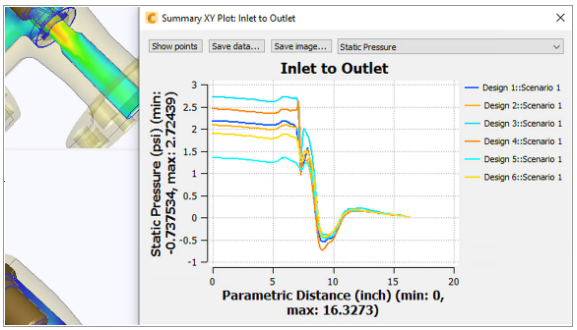
Result points Plot the time- or iteration-history at a specific location in the model, and designate Summary Points to assess Critical Values to compare results from multiple scenarios. |
Post-processing
|
Export to FEA Autodesk CFD results can be applied as boundary conditions for FEA analyses using popular FEA tools. |
Autodesk CFD Viewer Collaborate across multiple engineering workgroups by presenting and sharing Autodesk CFD graphical results. |
Report generator Customize and expedite the way you communicate results with reports. |
Compare
Compare Autodesk CFD Premium and CFD Ultimate
|
|
|
|
|
Design study environment |
||
|
Direct modeling with SimStudio Tools |
✔ |
✔ |
|
Defeaturing with SimStudio Tools |
✔ |
✔ |
|
MultiCAD data exchange |
✔ |
✔ |
|
Design study automation |
✔ |
✔ |
|
Multi-scenario design review center |
✔ |
✔ |
|
Model-centric interface |
✔ |
✔ |
|
Customizable material databases |
✔ |
✔ |
|
Heat sink, compact thermal, LED, and TEC models |
✔ |
✔ |
|
Fan, porous media, HX, TIM, and PCB models |
✔ |
✔ |
|
Non-Newtonian fluid materials |
✔ |
✔ |
|
Point, wall, and bulk-flow data extraction |
✔ |
✔ |
|
Pre- and post-processing API |
✔ |
✔ |
|
Customizable report generator |
✔ |
✔ |
|
Web and mobile storage, sharing, and viewing |
✔ |
✔ |
|
FSI with Simulation Mechanical |
✔ |
✔ |
|
Simulation Data Management with Vault |
✔ |
✔ |
|
Export results to Showcase, 3ds max, VRED, Maya |
✔ |
✔ |
|
Fluid flow |
|
|
|
2D and 3D Cartesian |
✔ |
✔ |
|
2D axisymmetric |
✔ |
✔ |
|
Laminar flow |
✔ |
✔ |
|
Turbulent flow |
✔ |
✔ |
|
Incompressible flow |
✔ |
✔ |
|
Subsonic flow |
✔ |
✔ |
|
Compressible flow |
✔ |
✔ |
|
Steady state (time-independent) |
✔ |
✔ |
|
Transient (time-varying) |
✔ |
✔ |
|
Lagrangian particle tracking |
✔ |
✔ |
|
Two-fluid scalar mixing |
✔ |
✔ |
|
Two-phase flows (humidity and steam) |
✔ |
✔ |
|
Nucleate boiling |
✔ |
✔ |
|
Height of fluid |
✔ |
✔ |
|
Free surface (Volume of fluid) |
✔ |
✔ |
|
Compressible liquid (water hammer) |
✔ |
✔ |
|
Cavitation |
✔ |
✔ |
|
Heat transfer |
|
|
|
Conduction and conjugate heat transfer |
✔ |
✔ |
|
Forced, natural, mixed convection |
✔ |
✔ |
|
Thermal comfort calculation |
✔ |
✔ |
|
Temperature-dependent heat source |
✔ |
✔ |
|
Radiation heat transfer |
✔ |
✔ |
|
Radiation through transparent media |
✔ |
✔ |
|
Solar loading |
✔ |
✔ |
|
Temperature-dependent emissivity |
✔ |
✔ |
|
Joule heating |
✔ |
✔ |
|
Intelligent meshing |
|
|
|
Geometry mesh diagnostics |
✔ |
✔ |
|
Automatic mesh sizing |
✔ |
✔ |
|
Solution-adaptive mesh |
✔ |
✔ |
|
Global and local size adjustment |
✔ |
✔ |
|
Boundary-layer mesh enhancement |
✔ |
✔ |
|
Interactive mesh-refinement regions |
✔ |
✔ |
|
Extrusion meshing |
✔ |
✔ |
|
Mesh growth-rate control |
✔ |
✔ |
|
Fluid gap and thin solid refinement |
✔ |
✔ |
|
Surface wrap meshing |
✔ |
✔ |
|
K-epsilon |
✔ |
✔ |
|
K-epsilon with intelligent wall formulation |
✔ |
✔ |
|
Low Reynolds number K-epsilon |
✔ |
✔ |
|
SST k-omega |
✔ |
✔ |
|
SST k-omega SAS (Scale Adaptive Simulation) |
✔ |
✔ |
|
SST k-omega DES (Detached Eddy Simulation) |
✔ |
✔ |
|
SST K-omega RC (Smirnov Menter) |
✔ |
✔ |
|
SST K-omega RC (Hellsten) |
✔ |
✔ |
|
RNG |
✔ |
✔ |
|
Eddy viscosity |
✔ |
✔ |
|
Mixing length |
✔ |
✔ |
|
Automatic turbulence startup |
✔ |
✔ |
|
Laminar |
✔ |
✔ |
|
Solid-body motion |
|
|
|
User prescribed or fluid driven motion |
✔ |
|
|
Multiple rotating frame of reference |
✔ |
|
|
Linear |
✔ |
|
|
Angular |
|
✔ |
|
Combined linear and angular |
|
✔ |
|
Combined orbital and angular |
|
✔ |
|
Nutating |
|
✔ |
|
Sliding vane |
|
✔ |
|
Unconstrained (6 DOF) motion |
|
✔ |
|
High-performance solving |
|
|
|
Multicore single machine |
✔ |
✔ |
|
Microsoft HPC cluster |
✔ |
✔ |
|
Cluster solving using Cloud Premium |
✔ |
✔ |
|
Remote solving |
✔ |
✔ |
|
CAD Standards ToolsParallel solving on multiple machines |
✔ |
✔ |

Trial Download
CFD Trial Software Download
Download and test CFD before you make your purchasing decision.
Specs
Installation Requirements
In order to work properly, your copy of CFD requires CFD Design Study Environment.
HW Suggestions
Recommended System Specification
NOVEDGE is an authorized HP reseller that offers a wide range of professional quality notebooks and workstations to meet your hardware needs.
In addition, NOVEDGE works with High Speed Computing to customize workstations to give you the perfect hardware for your design needs at a competitive price. Contact us to discuss pre-built and custom configuration workstations and laptops.
You can find our selection of high performance hardware products at this LINK.
Below you can try our free experimental AI Service, which makes computer hardware recommendations for selected design software products. Our goal is to make it as good as a first line support human person, and it can work for you 24/7. Please give us your feedback to help make this service as good as it can be.
If you need help with sales instead, we have an excellent human team that will be happy to help you find the products best fit your needs from our very large selection of standard and custom workstations and laptops. You can get in touch with them by email at [email protected] or phone at 1-415-848-9018.
If you do not get a satisfactory answer try to rephrase the question in a more specific/detailed way
This service is a prototype and therefore it may return incorrect or incomplete answers. Furthermore, Artificial Intelligence is intrinsically prone to occasional mistakes, misunderstandings, and incomplete answers at least as much as human intelligence is.
This experimental service is offered as is and free of charge as a demonstration of the capabilities of Artificial Intelligence as an automated tool for support. Although the information found on this system has been produced and processed from sources believed to be reliable, no warranty, express or implied, is made regarding accuracy, adequacy, completeness, legality, reliability, or usefulness of any information.
Description
Overview
Minimize the need for physical prototypes while providing deeper insight into fluid flow design performance: Autodesk CFD provides computational fluid dynamics software features and thermal simulation tools with improved reliability and performance. Compare design alternatives and better understand the implications of your choices before manufacturing.
|
Highlights
|
|
Design systems with fluid, thermal and motion insights
|
Automate design studies for improved efficiency
|
|
Key Features
|
Flow control applications Optimize designs when you need to improve pressure drop or flow distribution |
Thermal prototyping Solve for all modes of heat transfer, from solid to solid or solid to fluid |
Architectural and MEP applications Improve building efficiency with optimized HVAC design |
|
Free surface modeling Simulate interfaces between liquids and gases. Model flow phenomena like waves, sloshing, and spilling |
Motion simulation Analyze the interaction between solid objects in motion and surrounding fluid |
Humidity and condensation Model condensation of a liquid from a moist gas |
|
Solar heating loads Identify effects of solar heating on energy performance and efficiency of a structure and its spaces |
Smoke visibility Determine smoke patterns as they fill a room to help identify design changes and exit sign placement |
Rotating (turbomachinery) Analyze rotating devices surrounded by a static (non-rotating) frame of reference |
Features
Import and Setup
|
|
|
|
Launch from CAD Send CAD models to Autodesk CFD from Autodesk Inventor, Autodesk Revit, AutoCAD Architecture, and AutoCAD MEP. Simplified import of other third-party native CAD models. |
Surface Wrap Consolidate multiple bodies of a model using surface wrap, add an external volume, and generate a quality mesh for transfer into Autodesk CFD. |
Mesh import and adaptive mesh Import existing mesh such as I-deas (.unv) or Nastran (.nas or .dat). Apply adaptive mesh sizing, which utilizes a comprehensive topological interrogation of the analysis geometry to apply appropriate sizes throughout the design. |
Solving
|
Solver manager Schedule, manage, and simulate multiple scenarios from a single dialog. |
Custom result calculations Set up custom result quantities to analyze and visualize quantities beyond the standard CFD results. |
Remote solving Run simulations on remote computers on your network, and schedule multiple solves across different computers. |
|
High Performance Computing (HPC) Autodesk CFD supports running simulations on multi-core computers, as well as with clusters of computers. |
Cloud solving Autodesk CFD offers an Autodesk token cloud solve option for completing simulations without tying up local resources. |
Scalable Solver For simulations with over 10 million elements, the Scalable Solver enables each process to run on multiple threads as a process/thread hybrid and is designed to optimize cache performance. |
Result visualization
|
Cross-sectional planes Visualize results through a 3D model on a cross-sectional colorized view. |
Particle tracing Virtually simulate injected dye streams to identify flow movement through particle tracing. |
Iso surfaces Review a constant value flow result with the predicted physical shape of the flow characteristics. |
|
Iso volumes Visualize the range of result values of a volume of a model. |
Wall calculator Calculate flow-induced forces on solid and wall surfaces, including heat flux and wall temperature. |
Result Parts Result Parts can be assessed and designated as Summary Parts and used in the Decision Center to assess Critical values. |
|
Result points Plot the time- or iteration-history at a specific location in the model, and designate Summary Points to assess Critical Values to compare results from multiple scenarios. |
Post-processing
|
Export to FEA Autodesk CFD results can be applied as boundary conditions for FEA analyses using popular FEA tools. |
Autodesk CFD Viewer Collaborate across multiple engineering workgroups by presenting and sharing Autodesk CFD graphical results. |
Report generator Customize and expedite the way you communicate results with reports. |
Compare
Compare Autodesk CFD Premium and CFD Ultimate
|
|
|
|
|
Design study environment |
||
|
Direct modeling with SimStudio Tools |
✔ |
✔ |
|
Defeaturing with SimStudio Tools |
✔ |
✔ |
|
MultiCAD data exchange |
✔ |
✔ |
|
Design study automation |
✔ |
✔ |
|
Multi-scenario design review center |
✔ |
✔ |
|
Model-centric interface |
✔ |
✔ |
|
Customizable material databases |
✔ |
✔ |
|
Heat sink, compact thermal, LED, and TEC models |
✔ |
✔ |
|
Fan, porous media, HX, TIM, and PCB models |
✔ |
✔ |
|
Non-Newtonian fluid materials |
✔ |
✔ |
|
Point, wall, and bulk-flow data extraction |
✔ |
✔ |
|
Pre- and post-processing API |
✔ |
✔ |
|
Customizable report generator |
✔ |
✔ |
|
Web and mobile storage, sharing, and viewing |
✔ |
✔ |
|
FSI with Simulation Mechanical |
✔ |
✔ |
|
Simulation Data Management with Vault |
✔ |
✔ |
|
Export results to Showcase, 3ds max, VRED, Maya |
✔ |
✔ |
|
Fluid flow |
|
|
|
2D and 3D Cartesian |
✔ |
✔ |
|
2D axisymmetric |
✔ |
✔ |
|
Laminar flow |
✔ |
✔ |
|
Turbulent flow |
✔ |
✔ |
|
Incompressible flow |
✔ |
✔ |
|
Subsonic flow |
✔ |
✔ |
|
Compressible flow |
✔ |
✔ |
|
Steady state (time-independent) |
✔ |
✔ |
|
Transient (time-varying) |
✔ |
✔ |
|
Lagrangian particle tracking |
✔ |
✔ |
|
Two-fluid scalar mixing |
✔ |
✔ |
|
Two-phase flows (humidity and steam) |
✔ |
✔ |
|
Nucleate boiling |
✔ |
✔ |
|
Height of fluid |
✔ |
✔ |
|
Free surface (Volume of fluid) |
✔ |
✔ |
|
Compressible liquid (water hammer) |
✔ |
✔ |
|
Cavitation |
✔ |
✔ |
|
Heat transfer |
|
|
|
Conduction and conjugate heat transfer |
✔ |
✔ |
|
Forced, natural, mixed convection |
✔ |
✔ |
|
Thermal comfort calculation |
✔ |
✔ |
|
Temperature-dependent heat source |
✔ |
✔ |
|
Radiation heat transfer |
✔ |
✔ |
|
Radiation through transparent media |
✔ |
✔ |
|
Solar loading |
✔ |
✔ |
|
Temperature-dependent emissivity |
✔ |
✔ |
|
Joule heating |
✔ |
✔ |
|
Intelligent meshing |
|
|
|
Geometry mesh diagnostics |
✔ |
✔ |
|
Automatic mesh sizing |
✔ |
✔ |
|
Solution-adaptive mesh |
✔ |
✔ |
|
Global and local size adjustment |
✔ |
✔ |
|
Boundary-layer mesh enhancement |
✔ |
✔ |
|
Interactive mesh-refinement regions |
✔ |
✔ |
|
Extrusion meshing |
✔ |
✔ |
|
Mesh growth-rate control |
✔ |
✔ |
|
Fluid gap and thin solid refinement |
✔ |
✔ |
|
Surface wrap meshing |
✔ |
✔ |
|
K-epsilon |
✔ |
✔ |
|
K-epsilon with intelligent wall formulation |
✔ |
✔ |
|
Low Reynolds number K-epsilon |
✔ |
✔ |
|
SST k-omega |
✔ |
✔ |
|
SST k-omega SAS (Scale Adaptive Simulation) |
✔ |
✔ |
|
SST k-omega DES (Detached Eddy Simulation) |
✔ |
✔ |
|
SST K-omega RC (Smirnov Menter) |
✔ |
✔ |
|
SST K-omega RC (Hellsten) |
✔ |
✔ |
|
RNG |
✔ |
✔ |
|
Eddy viscosity |
✔ |
✔ |
|
Mixing length |
✔ |
✔ |
|
Automatic turbulence startup |
✔ |
✔ |
|
Laminar |
✔ |
✔ |
|
Solid-body motion |
|
|
|
User prescribed or fluid driven motion |
✔ |
|
|
Multiple rotating frame of reference |
✔ |
|
|
Linear |
✔ |
|
|
Angular |
|
✔ |
|
Combined linear and angular |
|
✔ |
|
Combined orbital and angular |
|
✔ |
|
Nutating |
|
✔ |
|
Sliding vane |
|
✔ |
|
Unconstrained (6 DOF) motion |
|
✔ |
|
High-performance solving |
|
|
|
Multicore single machine |
✔ |
✔ |
|
Microsoft HPC cluster |
✔ |
✔ |
|
Cluster solving using Cloud Premium |
✔ |
✔ |
|
Remote solving |
✔ |
✔ |
|
CAD Standards ToolsParallel solving on multiple machines |
✔ |
✔ |
Trial Download
CFD Trial Software Download
Download and test CFD before you make your purchasing decision.
Specs
Installation Requirements
In order to work properly, your copy of CFD requires CFD Design Study Environment.
HW Suggestions
Recommended System Specification
NOVEDGE is an authorized HP reseller that offers a wide range of professional quality notebooks and workstations to meet your hardware needs.
In addition, NOVEDGE works with High Speed Computing to customize workstations to give you the perfect hardware for your design needs at a competitive price. Contact us to discuss pre-built and custom configuration workstations and laptops.
You can find our selection of high performance hardware products at this LINK.
Below you can try our free experimental AI Service, which makes computer hardware recommendations for selected design software products. Our goal is to make it as good as a first line support human person, and it can work for you 24/7. Please give us your feedback to help make this service as good as it can be.
If you need help with sales instead, we have an excellent human team that will be happy to help you find the products best fit your needs from our very large selection of standard and custom workstations and laptops. You can get in touch with them by email at [email protected] or phone at 1-415-848-9018.
If you do not get a satisfactory answer try to rephrase the question in a more specific/detailed way
This service is a prototype and therefore it may return incorrect or incomplete answers. Furthermore, Artificial Intelligence is intrinsically prone to occasional mistakes, misunderstandings, and incomplete answers at least as much as human intelligence is.
This experimental service is offered as is and free of charge as a demonstration of the capabilities of Artificial Intelligence as an automated tool for support. Although the information found on this system has been produced and processed from sources believed to be reliable, no warranty, express or implied, is made regarding accuracy, adequacy, completeness, legality, reliability, or usefulness of any information.